 What is Coda?
A quick overview!
Coda is the all-in-one doc that brings words, data, and teams together. It starts with a blinking cursor on a blank page and can grow as big as your team’s ambition. Coda comes with a set of building blocksーlike pages for infinite depth, tables that talk to each other, and buttons that take action inside or outside your docーso anyone can make a doc as powerful as an app.
Hit / to see a few of them, or click into the collapsed sections below to see a quick walkthrough:
A new type of doc.
A familiar start.
- Blinking cursor on a blank screen, full of opportunity.
- Blends the best of authoring and publishing with drag and drop support.
- All the expectations of a modern doc: real-time collaborative editor, 👉 emojis and markdown, disconnected mode, rich comments, easy to create and share.
With interactive content.
Embed videos, images, files right in the doc.
An organized, all-in-one place.
- Pages and subpages to organize your space (with friendly cover images and icons).
- Collapse regions to stay focused.
- /commands for useful templates.
With a few new tricks…
- Reactions, like this one - .
- Publish to the web as an interactive doc .
- Transforms automatically to a built-for-mobile experience.
A new type of table.
Flexible like a spreadsheet, organized like a database.
Here’s a table of tasks:
| Test on real streets | Not Started | Industrial Design ⚙ | 0022 | 10/4/19 | |||
|---|---|---|---|---|---|---|---|
| Add Street View | Not Started | Mapping 🗺 | 0021 | 9/12/19 | |||
| Design box | Not Started | Mapping 🗺 | 006 | 9/25/19 | |||
| Baseline Maps | Done | Packaging 📦 | 0033 | 9/2/19 | |||
| Design setup | In Progress | Packaging 📦 | 0014 | 10/2/19 |
So every team can focus on their part.
Here’s a view of that same table, filtered to just the Mapping team’s tasks.
With the perfect view for every person, team, and meeting.
You can even view the same data in a timeline, as cards, on a calendar, or as a chart.
Design self-driving stroller
Test on real streets
Add Street View
Design box
Baseline Maps
Design setup
Mar 2026
1
2
3
4
5
6
7
8
9
10
11
12
13
14
15
16
17
18
19
20
21
22
23
24
25
26
27
28
29
30
31
Apr 2026
1
2
3
4
5
6
7
8
9
10
11
12
13
14
15
16
17
18
19
20
21
22
23
24
25
26
27
28
29
30
May 2026
1
2
3
4
5
6
7
8
9
10
11
12
13
14
15
16
17
18
19
20
21
22
23
24
25
26
27
28
29
30
31
Jun 2026
1
2
3
4
5
6
7
8
9
10
11
12
13
14
15
16
17
18
19
20
21
22
23
24
25
26
27
28
29
30
Jul 2026
1
2
3
4
5
6
7
8
9
10
11
12
13
14
15
16
17
18
19
20
21
22
23
24
25
26
27
28
29
30
31
Aug 2026
1
2
3
4
5
6
7
8
9
10
11
12
13
14
15
16
17
18
19
20
21
22
23
24
25
26
27
28
29
30
31
Sep 2026
1
2
3
4
5
6
7
8
9
10
11
12
13
14
15
16
17
18
19
20
21
22
23
24
25
26
27
28
29
30
Oct 2026
1
2
3
4
5
6
7
8
9
10
11
12
13
14
15
16
17
18
19
20
21
22
23
24
25
26
27
28
29
30
31
Nov 2026
1
2
3
4
5
6
7
8
9
10
11
12
13
14
15
16
17
18
19
20
21
22
23
24
25
26
27
28
29
30
Month
TodayFit
Industrial Design ⚙
Mapping 🗺
Industrial Design ⚙
Mapping 🗺
A new type of app.
Finally, Coda is a new type of app. Check out some of the building blocks below that make it feel like a software application. 👇
Write formulas anywhere… a spreadsheet without a grid.
Number of tasks:
6
Hint: Type = (equals) to add formulas anywhere.
Buttons and controls… for an integrated app.
Industrial Design ⚙
2
Mapping 🗺
2
Industrial Design ⚙
2
Mapping 🗺
2
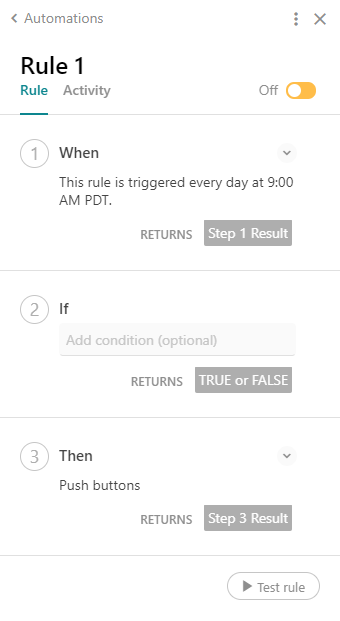
Automations… to put your doc on autopilot.
Automations are like Zapier or Integromat, but built right into this doc. They allow you to automate tedious tasks or followups.
For example:
IF someone updates a project deadline
THEN send me an email and add a task to my to-do list.
Packs… to integrate the rest of your world.
To learn more click on this box Coda: Your all-in-one collaborative workspace.Coda brings teams and tools together for a more organized work day. Learn why 50,000+ teams use Coda to supercharge their work days and foster collaborative workflows.coda.io
Supporting
Next up:
Broken link









View the original page ↗ · note: 3 embed(s) were broken on the source site